Free & open source
Everything you need — nothing you don't
AllerEasy is built around what hospitality teams actually need to manage allergen and nutrition compliance. Every feature listed here is included, out of the box, at no cost.
Guest-facing allergen menu
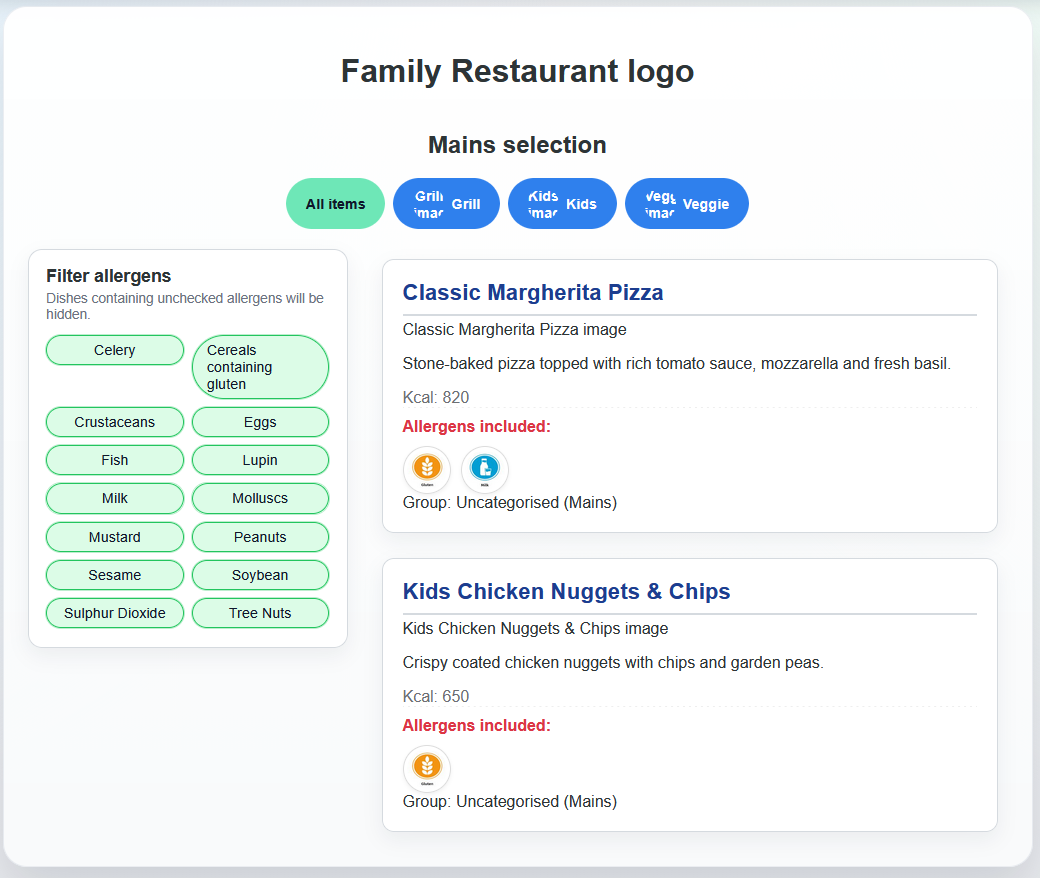
The customer-facing menu is designed to be clean, fast, and easy to use on any device. Guests can browse dishes by category, filter by allergen, and see kcal and nutrition information without needing to ask staff.
- Filter dishes by any of the 14 regulated allergens
- Dietary flags — vegan and vegetarian clearly marked
- Calories displayed alongside each dish
- Optional extended nutrition (carbs, protein, fat, salt, etc.)
- Category and subcategory navigation for larger menus
- Works on mobile, tablet, and desktop
- QR code accessible — just point guests at the URL
Allergen management
AllerEasy is built around the 14 allergens regulated under UK and EU food information law. Each dish can be tagged with any combination of these allergens, and the system handles the common complexity of grouped allergens automatically.
All 14 regulated allergens
Celery, cereals containing gluten, crustaceans, eggs, fish, lupin, milk, molluscs, mustard, peanuts, sesame, soya, sulphur dioxide & sulphites, and tree nuts — all tracked per dish.
Automatic gluten grouping
When importing from CSV, columns named wheat, barley, rye, oats, spelt, or kamut are automatically mapped to the single regulated group "Cereals containing gluten" — no manual reclassification needed.
Per-dish allergen tagging
Tag each dish with as many allergens as needed via the admin dashboard or via bulk import. Changes take effect on the guest menu immediately.
Allergen CSV converter
Have an existing allergen matrix in spreadsheet format? Upload it and AllerEasy maps it to the correct regulated groups — saving hours of manual work when onboarding.
Nutritional data
Beyond allergens, AllerEasy stores a comprehensive per-dish nutrition profile. This supports UK calorie labelling rules for larger operators, and provides useful information for guests managing specific dietary needs.
Calories (kcal)
Per dish, displayed on the guest menu
Carbohydrates
Helpful for guests managing diabetes
Protein
Stored and optionally displayed per dish
Fat & saturated fat
Total fat and saturated fat tracked separately
Sugar
Per dish nutritional field
Fibre
Stored per dish
Salt
Tracked per dish
Portion size
Contextualise data (e.g. "per serving" or "per 100g")
Staff dashboard
The staff dashboard is designed for chefs, managers, and F&B teams — not developers. It provides everything needed to keep allergen data accurate and up to date, without requiring technical knowledge to use day-to-day.
Dish management
Add, edit, and delete dishes individually. Each dish has fields for name, description, category, subcategory, allergens, nutrition, dietary flags, status, and supplier details.
Dish status workflow
Mark dishes as active, inactive, or archived. Inactive and archived dishes don't appear on the guest menu but remain in the database. Useful for seasonal items and menu rotations.
Bulk actions
Archive or delete multiple dishes at once from the dish list. Combined with bulk import, this makes menu changeovers manageable at scale.
Search & filter
The dish list supports search by name, description, category, or menu type — making it easy to find and update specific items quickly in a large menu.
Supplier & product data
Optionally record supplier name, internal product codes, barcodes, and links to spec sheets per dish — useful for kitchens that need to trace ingredients back to source.
Edit confirmation & locking
Dish edits go through a confirmation step where a reason must be provided. An optional edit lock prevents concurrent changes to the same dish within a configurable window.
Bulk import — CSV & JSON
If you already have allergen data in a spreadsheet or database export, you don't need to enter everything manually. AllerEasy accepts CSV and JSON uploads and maps your existing data to the right fields automatically.
- Upload a CSV or JSON file from the dashboard import page
- Allergen column names are mapped to regulated groups automatically
- Common variants handled — "wheat", "gluten", "barley" all resolve correctly
- Sample CSV and JSON files included in the repository as templates
- Errors are flagged clearly so you can correct your data before re-importing
Supported CSV column examples
These column names are recognised and mapped automatically:
wheatbarleyryeoatsglutenmilkeggspeanutssoyacelerymustardsesameA full sample template is included in the GitHub repository.
Branding & customisation
AllerEasy is designed to look like your business, not a generic piece of software. Every visual element of the customer-facing menu can be configured per menu type from the dashboard.
Colour palette
Set primary, secondary, accent, text, and background colours independently using hex codes. The menu updates immediately.
Logo & imagery
Set a logo and background image per menu type via URL. Multiple venues can each have their own logo within the same installation.
Typography
Set the font family using any CSS font stack — use Google Fonts, system fonts, or your brand's custom typeface.
Multiple menu types
Create separate menu types for different venues, brands, or menus (e.g. food menu vs drinks menu) each with independent branding and dish lists.
Category images
Each category and subcategory can have its own image, giving the guest menu a rich, visual feel that reflects your venue's atmosphere.
Responsive across all devices
The guest menu is fully responsive. Whether guests are on a phone, tablet, or a wall-mounted display, the layout adapts automatically.
Audit trail & compliance logging
Every change made to a dish in AllerEasy is recorded in full. This provides a clear, time-stamped compliance record — essential for businesses where allergen accuracy must be demonstrable.
- Every edit logged with username, timestamp, and reason
- Which fields were changed and what the old values were
- Full audit log viewable from the dashboard
- Reason for change is required before saving an edit
- Log is searchable and filterable
User & access management
Control who can do what within the system. AllerEasy has two levels of access — superusers have full control, while standard users can manage dish data but not system settings.
- Create and manage staff accounts from the dashboard
- Superusers manage users, branding, and all system settings
- Standard users can add, edit, and update dishes
- All dashboard access requires login
- Custom login page — the standard Django admin URL is hidden
Built on solid, well-supported technology
AllerEasy uses established, well-documented open-source frameworks — easy to maintain, extend, and deploy.
Python / Django 4.2
Stable LTS framework with excellent documentation
PostgreSQL
Robust relational database for production use
pandas & numpy
CSV and data processing at import time
WhiteNoise & Gunicorn
Production-ready static file serving and WSGI
Pro & Business plans
Premium features
These features are available on paid plans — either managed for you on our infrastructure, or as add-ons for self-hosted deployments. The core app remains free and open source.
QR code generator
Generate a branded QR code for any menu type directly from the dashboard — no third-party tool needed. Print it, display it on a table card, or embed it in your own materials. Guests scan and land straight on your allergen menu.
Allergen change notifications
When a dish's allergen information is updated, an automatic email notification is sent to designated staff members. Keeps your front-of-house team and managers informed in real time — no more relying on people checking the dashboard manually after a recipe change.
Guest allergen profiles
Guests can save their allergen preferences via a personal link and return to a pre-filtered menu on future visits — without needing to create an account. The menu remembers which allergens to exclude automatically, making the experience faster and more personal for regular guests.
Multi-site management dashboard
A single login to manage all your venues from one place. See all sites, switch between them instantly, and manage shared dish data or venue-specific menus without logging in and out of separate accounts. Built for groups, parks, and franchise operators.
Guest menu analytics
See which dishes guests view most, which allergens they filter for, and where drop-off happens in your menu. Understand your guests' dietary needs at scale — useful for menu planning, stock decisions, and demonstrating the value of your allergen information investment.
EPOS & API integration
A REST API layer that lets your existing EPOS or stock management system push and pull dish data directly to and from AllerEasy. When a dish is updated in your till, the allergen menu updates automatically — and vice versa. Eliminates double-entry and keeps both systems in sync.
In development
The following features are planned for a future release. If either of these would be valuable to your operation, register your interest — it helps prioritise the roadmap.
Supplier & barcode lookup
Link dishes to supplier products by barcode or product code. Allergen data pulled directly from supplier records — no manual entry when formulations change.
Register interestEPOS direct sync
Real-time two-way sync between AllerEasy and your till system — dish updates in your EPOS reflect on the allergen menu automatically, and vice versa.
Register interest